FabricCloud Product User Manual
Release version: FabricCloud
v0.1.0-rc.75
Public URL: fabriccloud.fabricintelligence.com.au
Roles: Customer and Platform Operator
Updated: 22 September 2026
1. Product purpose and value
FabricCloud is a managed AI inference delivery platform. The primary product object presented to a customer is an Endpoint, not a GPU, virtual machine, cluster, or Provider account.
FabricCloud addresses four direct customer needs:
- Faster access to usable model services. Create an Endpoint from a published Service Offer without installing drivers, runtimes, gateways, or monitoring components.
- A stable integration boundary. Applications use a FabricCloud URL, model identifier, and API key. Provider, hardware, and runtime details stay behind the platform boundary.
- Visible service and cost state. Customers can inspect Endpoint status, usage, hourly price, wallet balance, runtime charges, and invoices. Operators can inspect the underlying evidence and cleanup state.
- An auditable resource lifecycle. Publication requires evidence bound to an exact model, runtime, hardware shape, and region. Suspend, Restart, and Delete require verified resource cleanup.
FabricCloud is not a general GPU cloud, Kubernetes dashboard, or SSH host marketplace. Customers do not receive Provider credentials, Provider instance IDs, host addresses, or dstack administration access.
2. Roles and permission boundaries
| Capability | Customer | Operator |
|---|---|---|
| Sign in and select a workspace | Enter an organization they belong to | Switch between organizations they are authorized to manage |
| View Service Offers | Current published Offers only | Current and historical Offers |
| Create and manage Endpoints | Yes, within their organization | Inspect Deployments and execution evidence |
| Use Studio and APIs | Yes, for authorized services in their organization | Cannot view customer prompt or response content |
| Create API keys | Organization Owner/Admin, subject to policy | Cannot read customer key secrets |
| View usage and billing | Their organization only | Operational, settlement, and risk metadata |
| Manage team members | Owner/Admin can invite and manage members | Manage customer state and platform access boundaries |
| Import models and select runtimes | No | Yes |
| Refresh Provider inventory | No | Yes; read-only and does not create resources |
| Start paid certification | No | Yes; explicit cost and budget confirmation required |
| Publish Offers | No | Yes; exact certification and cleanup evidence required |
| Manage Provider credentials | No | Protected deployment configuration only; secrets are not returned to the browser |
Customer resources are isolated by organization. A Customer account cannot open Operator pages or access another organization's Endpoints, API keys, usage, or billing. The Operator workspace can switch between organizations the Operator is authorized to manage, but it must not expose customer prompt or response content, API key secrets, or Provider credentials.
3. Sign-in and accounts
Open the public FabricCloud URL. The current deployment supports:
- work email and password;
- Google;
- Microsoft;
- GitHub.
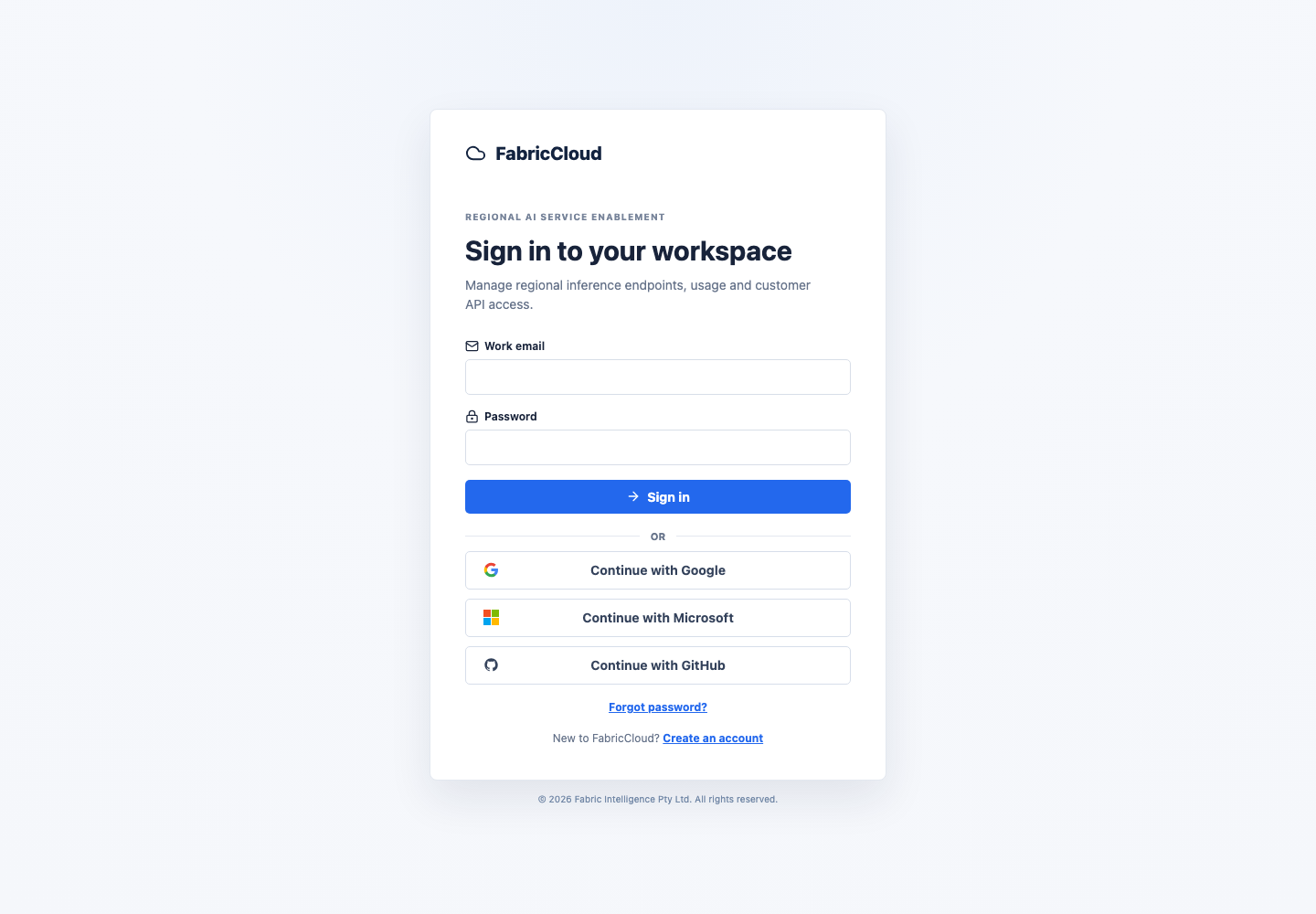
The current public deployment uses invitation-only registration. Contact an Operator if you have not received an invitation. An invited user can create an account with the invited email address or continue with an eligible OIDC identity when allowed by the invitation flow.
3.1 Password sign-in
- Enter your work email and password.
- Select Sign in.
- Customers are sent to
/console; Operators are sent to/operator. - Select Forgot password? when needed. Completing a password reset revokes existing sessions.
3.2 OIDC sign-in
Select Google, Microsoft, or GitHub. After authenticating with the external identity provider, you return to FabricCloud. OIDC establishes user identity; FabricCloud still owns organization membership, Endpoints, API keys, and billing state.
3.3 Operator MFA
When an Operator must enroll in MFA, FabricCloud displays an authenticator secret. Add it to an authenticator application, enter a one-time code, and store the recovery codes securely. Use a recovery code only when the normal authenticator is unavailable.
4. Customer workflow
The standard Customer journey is:
Sign in -> View Service catalog -> Create Endpoint -> Wait for Ready
        -> Verify in Studio -> Create API key -> Integrate the application
        -> Review usage and cost -> Suspend / Resume / Restart / Delete
4.1 Customer Console
The left navigation contains:
- Overview: Endpoint, request, latency, and runtime-spend summary;
- Endpoints: Endpoint status and lifecycle actions;
- Studio: interactive testing for published models and workflows;
- Usage & cost: runtime intervals, inference usage, and cost attribution;
- API keys: issue and revoke application credentials;
- Team: manage organization members and invitations;
- Billing: balance, top-ups, billing records, invoices, and notifications;
- Service catalog: published services available to the organization.
Some organizations may also have Private capacity enabled. The navigation item is hidden when the feature is not enabled.
4.2 Select a Service Offer
Open Service catalog. Customers see productized services, not unqualified inventory. An Offer normally presents:
- the model and service name;
- the customer data boundary and actual execution region;
- certified hardware specifications;
- On-Demand, Spot, or another capacity type;
- current availability and observation time;
- the customer hourly price;
- Suspend, Resume, and repricing behavior.
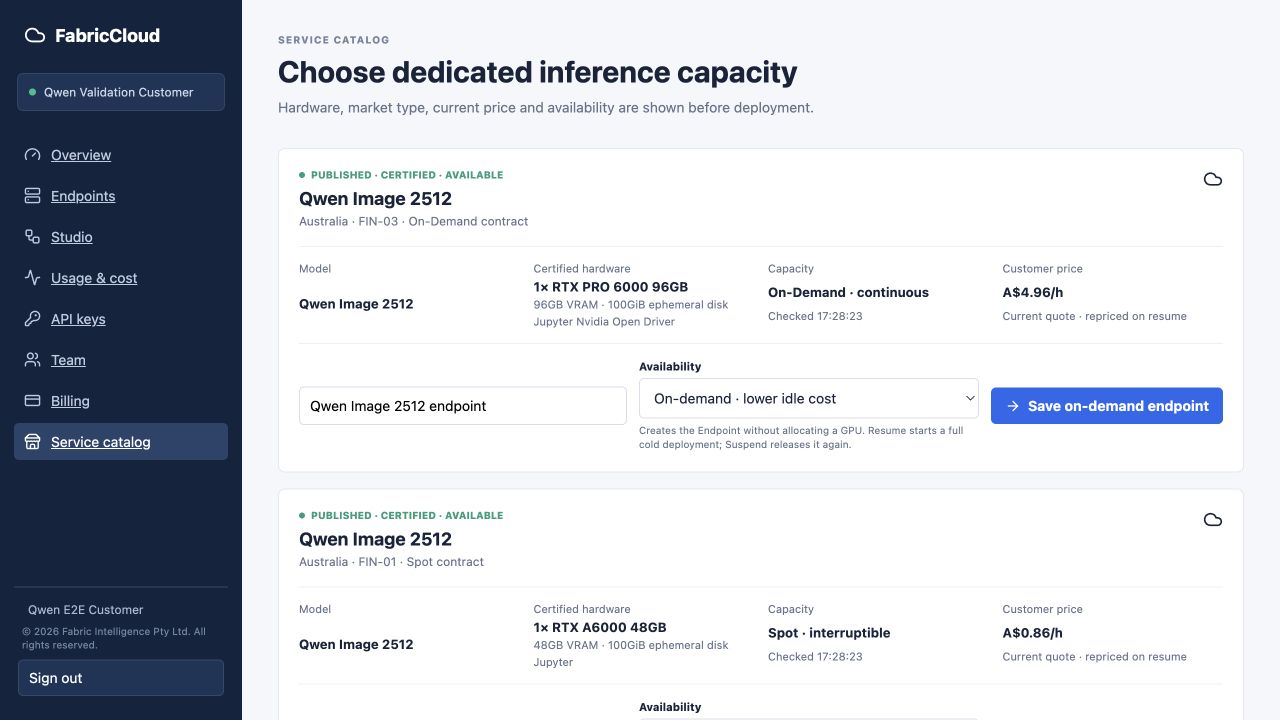
The Offer, price, region, and availability in a screenshot are real values from that validation point, not a permanent quotation. The current page and final confirmation are authoritative when creating an Endpoint.
4.3 Create an Endpoint
- Enter an Endpoint name on the Offer card.
- Choose when to start:
- Save endpoint: save it as
Suspendedwithout allocating paid capacity; - Check price and deploy now: recheck current capacity and price, then begin deployment.
- Save endpoint: save it as
- Read the billing and lifecycle explanation.
- Submit the request.
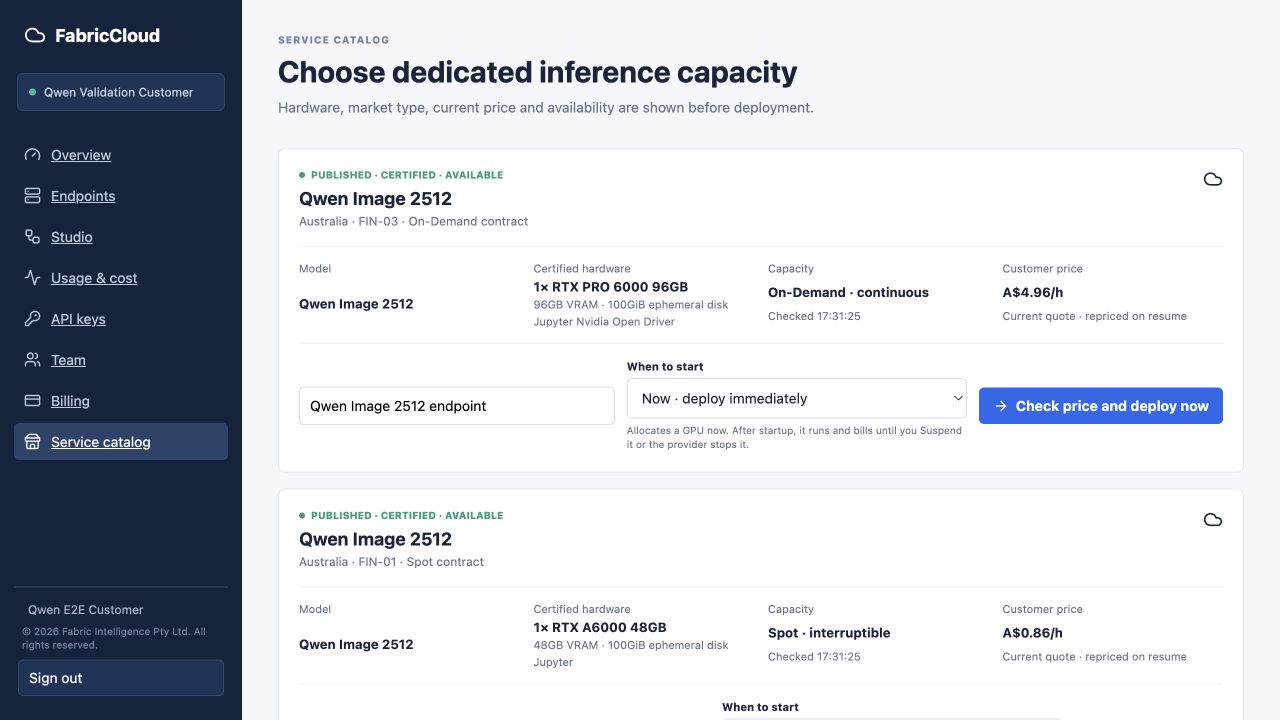
FabricCloud does not silently fall back across Offers or Providers. If the selected service is unavailable, it remains explicitly unavailable. The platform does not substitute a different price, hardware shape, or market type without Customer confirmation.
4.4 Endpoint states
| State | Meaning | Customer action |
|---|---|---|
suspended | No active runtime; compute and ephemeral disks are removed | Resume when required |
requested / submitted | The request and current price were recorded | Wait for processing |
provisioning | Capacity and runtime are being prepared | Wait; do not submit a duplicate request |
validating | Model, gateway, and request path are being checked | Wait for validation to finish |
ready | The Endpoint can accept requests | Use Studio or the API |
degraded | The runtime is temporarily unable to serve correctly | Review Latest activity and contact support |
suspend_pending | Runtime resources are being permanently removed | Wait for cleanup confirmation before Resume |
restart_pending | The old runtime is being cleaned up before recreation | Wait for the transition to finish |
deleted | The Endpoint was permanently deleted and cannot be resumed | Create a new Endpoint if required |
The page automatically refreshes important state. Ready is shown only after
model loading, gateway health, and the request path satisfy the service
contract. A Provider instance being created does not by itself make an
Endpoint ready.
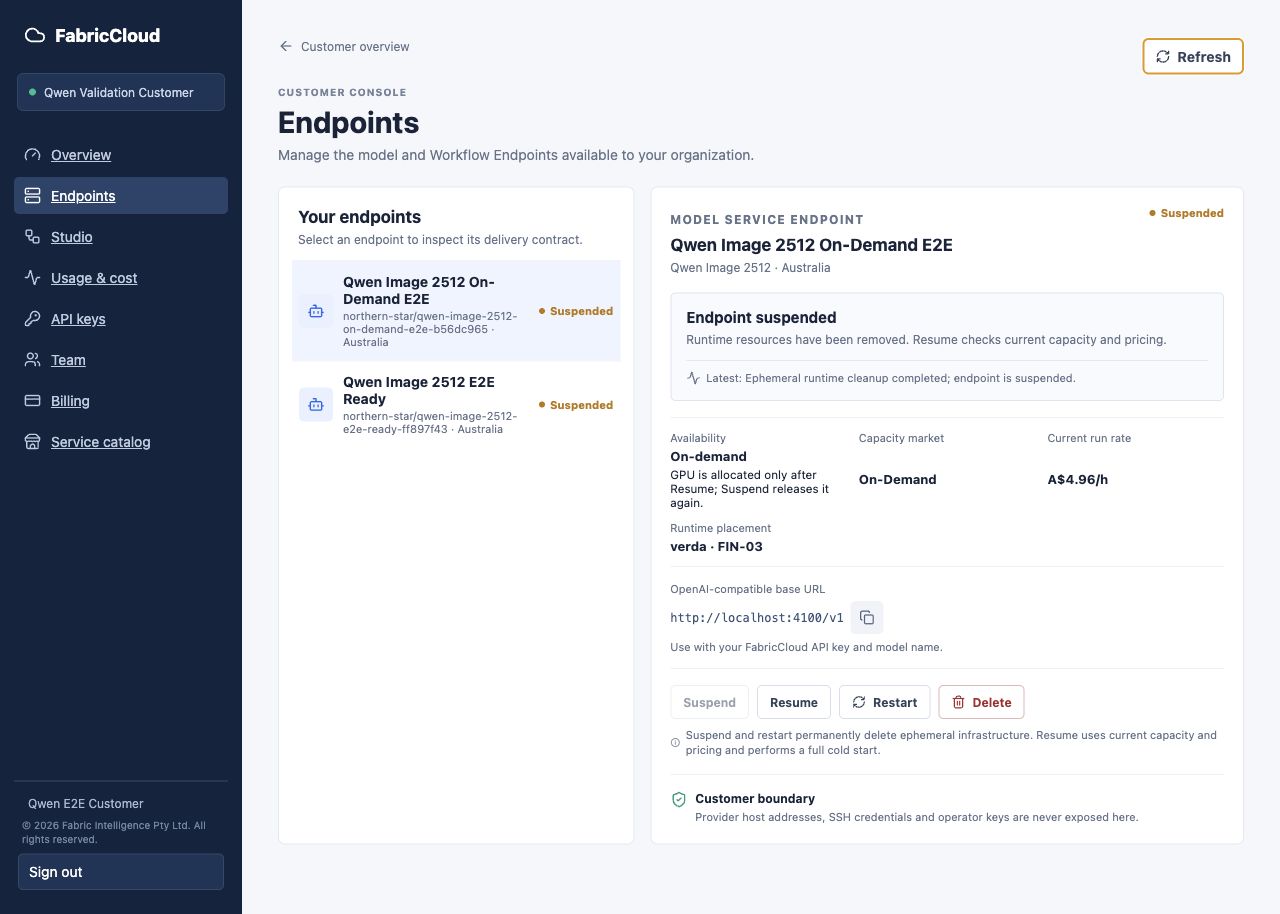
The full-width example below shows the same Endpoint detail surface while the
Endpoint is Suspended. The status banner, current state, placement, price,
API base URL, lifecycle actions, and customer boundary remain visible in one
place; the available actions change with lifecycle state.
4.5 Verify a service in Studio
- Open Studio.
- Select a published model service or workflow in the Catalog.
- Select a matching Endpoint in
Readystate. - For a chat-compatible model service, enter a message and use the same Endpoint for follow-up turns. For other services, enter a prompt, upload an input file, or set the parameters shown by the service form.
- Submit the run and wait for its result.
- Open Runs to inspect history, state, duration, and output artifacts.
Studio chooses the interaction from the published service contract. A chat-compatible service displays a conversation and sends its bounded prior turns with each new message. Image, video, audio, and workflow services retain their schema-driven forms. Changing the model service or Endpoint starts a new conversation, while every turn remains an individually auditable Run.
The example below shows the complete Studio layout with its Catalog, exact
Endpoint selector, request form, and live-result panel. It intentionally shows
an unavailable runtime; submit becomes available only after a matching
Endpoint reaches Ready.
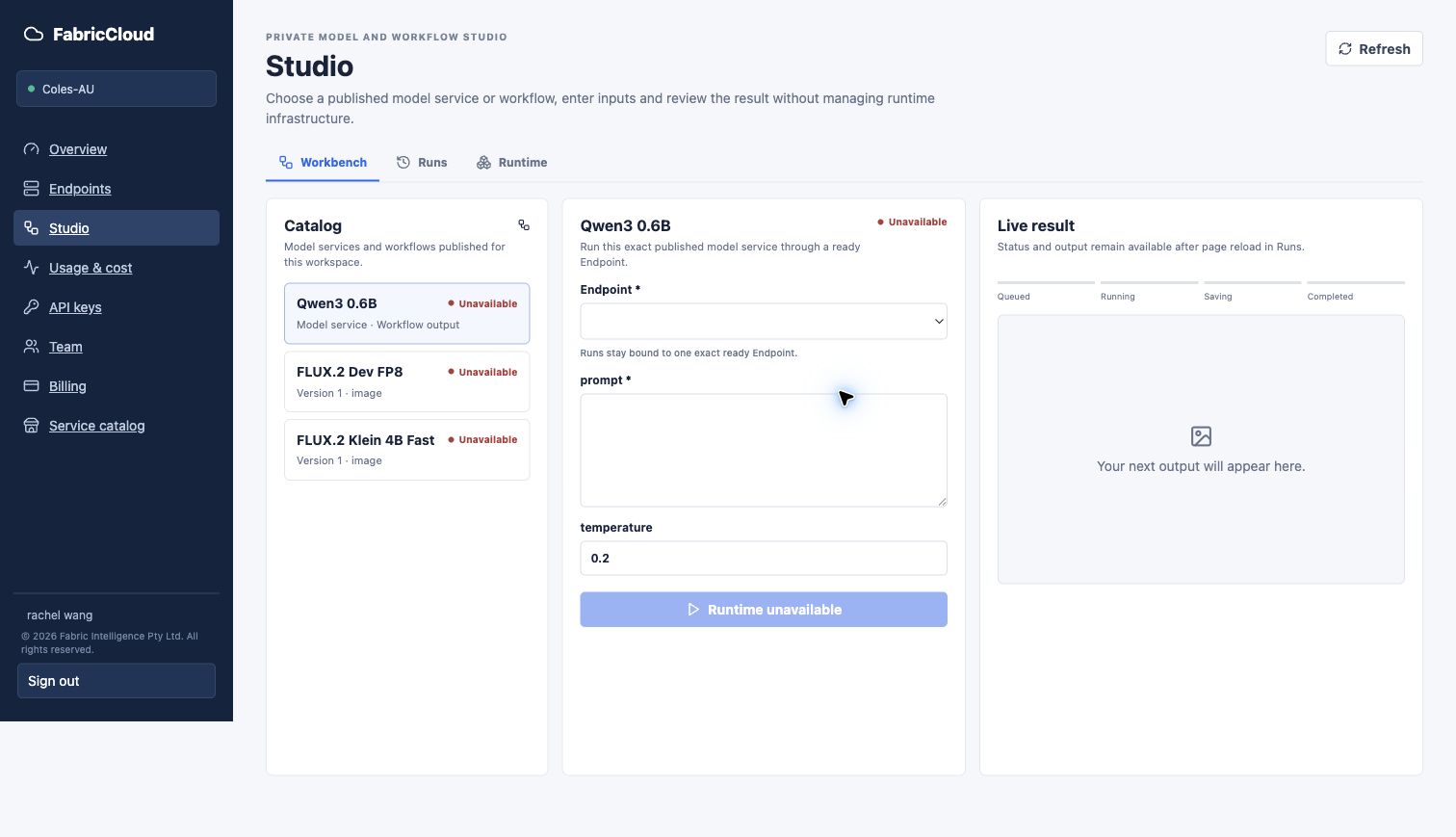
Studio is an interactive verification workspace. Production applications should call the public API with an API key instead of reusing a browser cookie. Inputs, outputs, parameters, and interaction style differ by service; follow the current Studio presentation and service description.
4.6 Create an API key
- Open API keys.
- Select Endpoint API.
- Enter a recognizable Key name.
- Set the organization-approved monthly budget limit.
- Select Issue key.
- Copy the secret immediately and store it in a password manager or Secret Manager.
The secret is displayed once. FabricCloud retains only the metadata required to manage the key. If a key is exposed, an employee leaves, or an application is retired, select Revoke key and issue a replacement.
If ComfyUI integration is enabled, the page can also issue a scope-limited ComfyUI node key and generate its configuration. This key is not a replacement for a general Endpoint API key.
4.7 Call the OpenAI-compatible API
Copy the OpenAI base URL and exact model identifier from the Endpoint page. Do not substitute a model name from a screenshot.
export FABRICCLOUD_API_BASE="https://fabriccloud.fabricintelligence.com.au/v1"
export FABRICCLOUD_API_KEY="<your-api-key>"
export FABRICCLOUD_MODEL="<model-id-shown-on-your-endpoint>"

curl "$FABRICCLOUD_API_BASE/chat/completions" \
  -H "Authorization: Bearer $FABRICCLOUD_API_KEY" \
  -H "Content-Type: application/json" \
  -d '{
    "model": "'"$FABRICCLOUD_MODEL"'",
    "messages": [
      {"role": "user", "content": "Summarise FabricCloud in one sentence."}
    ],
    "temperature": 0.2
  }'
Use this path only for a service that declares an OpenAI chat-compatible interface. Image, video, or workflow services may use Studio or a dedicated input contract documented by that service.
Common responses:
401: the API key is invalid, revoked, or missing;403: the key or organization is not authorized for the model;404: the model identifier is wrong or no matching Endpoint is available;429: a budget, concurrency, or rate limit was reached;503: the Endpoint is not yet Ready or service is temporarily interrupted.
4.8 Endpoint lifecycle actions
Suspend
Permanently removes the current compute resource and ephemeral runtime disks, stops subsequent Provider runtime charges, and retains Endpoint configuration, usage, and audit history. The effective billing stop is determined by verified cleanup and billing evidence.
Resume
Creates a fresh, cold-start runtime from Suspended. FabricCloud rechecks
current capacity and pricing. The previous quote is not carried forward
automatically, and the Customer must confirm the new quote.
Restart
Removes the current compute resource and ephemeral disks before creating a new runtime with current capacity and pricing. Restart is not an in-process hot restart.
Delete
Permanently deletes the Endpoint and makes it non-resumable. Historical usage, billing, and audit records remain subject to the applicable retention policy. The action requires explicit confirmation.
Spot capacity may be interrupted by the Provider. FabricCloud shows the cleanup process instead of presenting an interruption as a normal startup. Resume is enabled only after compute and ephemeral disks are confirmed absent.
4.9 Review Usage & cost
Open Usage & cost, select an Endpoint, and review:
- the current or recorded runtime interval;
- request, token, or service-defined usage metrics;
- current cost and organization monthly budget guardrail;
- Spot interruption and billing-stop information;
- optional workflow source labels.
FabricCloud stores usage metadata required for billing. Customer and Operator usage pages do not expose prompt or response content.
4.10 Manage the team
An Owner or Admin can use Team to:
- enter the invited user's work email;
- select the
memberoradminrole; - create an invitation valid for seven days;
- see whether the invitation was accepted;
- change a non-Owner member's role or remove the member.
The Owner role cannot be overwritten through ordinary role management. Invitation information must be sent through an approved business channel.
4.11 Billing
Billing provides:
- available balance and pending top-ups;
- current burn rate and estimated remaining runtime;
- card or bank-transfer top-ups;
- Runtime billing log;
- Inference usage log;
- AUD invoices and wallet payment;
- Endpoint, billing, and security notification preferences.
Card details remain in Stripe-hosted flows. FabricCloud does not store complete card information in the Portal. A balance becomes spendable only after payment settlement is confirmed by the system or an Operator.
5. Operator workflow
The primary Operator flow is:
Configure Providers and commercial guardrails
  -> Import immutable model revision
  -> Select compatible Runtime
  -> Generate Candidate comparison (read-only)
  -> Explicitly approve bounded paid certification
  -> Verify model load, inference, and permanent cleanup
  -> Publish Offer
  -> Monitor Customer Endpoints, billing, risk, and cleanup
5.1 Operator navigation
| Page | Primary purpose |
|---|---|
| Overview | Platform, Endpoint, and operational summary |
| Customers | Organizations, Endpoints, balances, spend, and risk; pause new paid creation |
| Models | Model revisions, Runtime matching, Candidates, certification, and publication |
| Runtime catalog | Controlled, digest-pinned Runtime Packages and Releases |
| Offer catalog | Current and historical Offers |
| Channels | Service distribution and channel mappings |
| Deployments | Deployments and lifecycle state behind Customer Endpoints |
| Host fleet | ResourcePools, Registered Hosts, and Managed Provider pools |
| Runtime evidence | Model load, gateway, request, and runtime evidence chain |
| Production readiness | Recovery, concurrency, accounting, incident, and cleanup gates |
| Access policies | Current organization, credential, and Operator security boundaries |
| Billing operations | Confirm settled manual top-ups |
| Platform settings | Pricing, certification budget, email, Provider, and integration settings |
Use the workspace selector to switch between organizations the Operator is authorized to manage. Platform Provider connections are platform-level configuration, not browser credentials owned by one Customer organization.
5.2 Configure guardrails and Providers
In Platform settings:
- Set target gross margin, maximum Customer hourly price, and the 24-hour certification budget.
- Enter a change reason and save. New settings do not rewrite an accepted quote for an active runtime.
- Review email-delivery state and send a test email when required.
- Review connections for Managed Providers such as Verda and Nebius.
- Use Test connection for a read-only authentication check.
- Use Refresh inventory to fetch current inventory. Refresh does not create a GPU resource.
Provider credentials come from protected deployment Secrets. The browser shows only configuration and connection state, never the secret value. Verda and Nebius are independent adapters and must not share credentials, resource identity, availability, or certification evidence.
5.3 Import a model and select a Runtime
In Models:
- Select Import model and provide the model repository and immutable revision.
- Review the resolved architecture, parameter count, precision, license, and model restrictions.
- In the Runtime tab, select a Runtime Package or Release whose capability manifest supports the exact model.
- Generate the immutable Model Service Release and Execution Variant.
Import creates metadata only. It does not download model weights, create Provider capacity, or incur GPU charges. An unknown architecture or missing compatible Runtime Package remains explicitly blocked and cannot be presented as publishable.
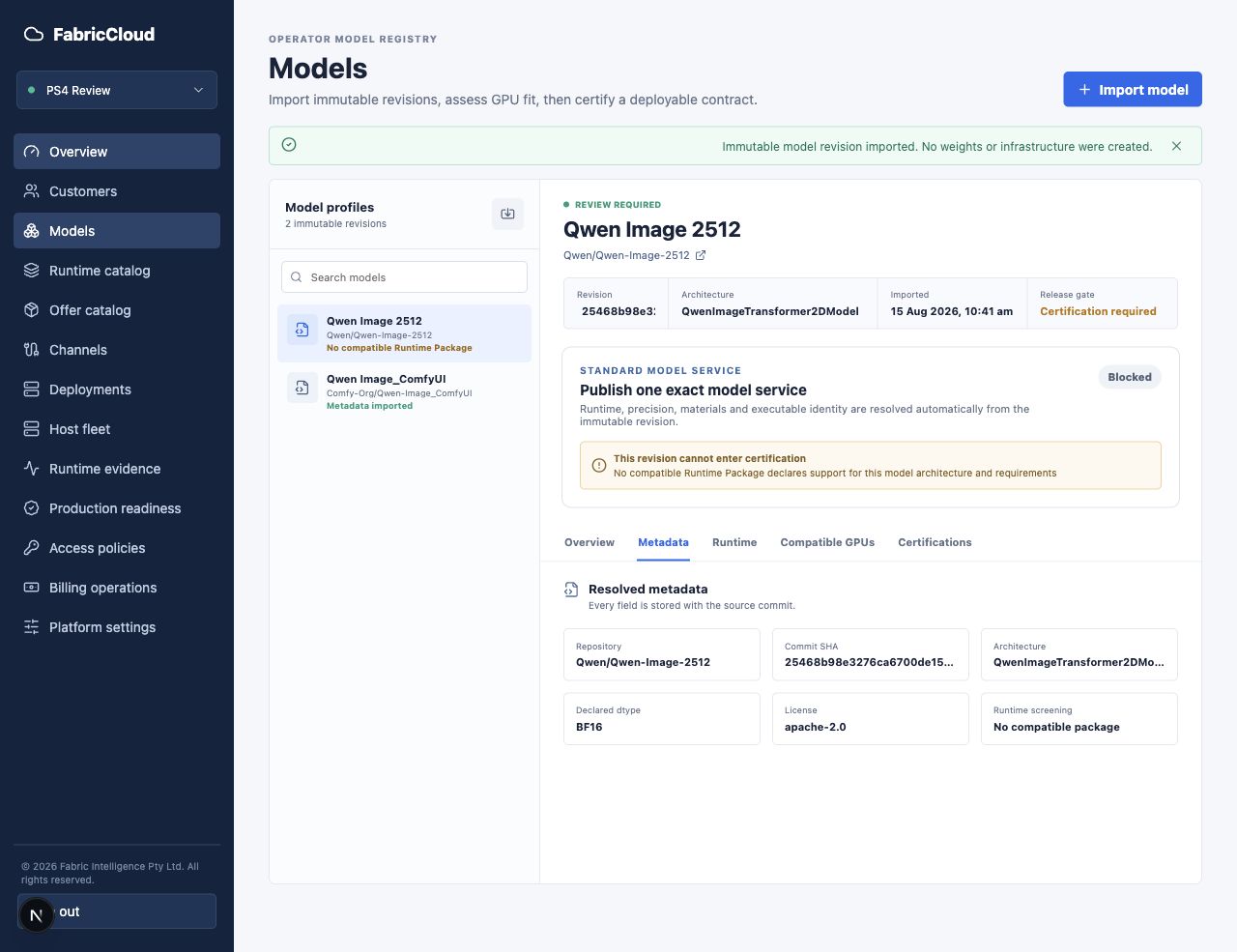
5.4 Compare resource Candidates
Open Compatible GPUs and select Generate comparison. The comparison evaluates these dimensions independently:
- physical fit for VRAM, GPU count, and storage;
- Runtime and kernel compatibility with the accelerator architecture;
- current, fresh operational availability;
- qualification evidence for the exact combination;
- current cost against platform guardrails.
Candidate comparison and inventory refresh are read-only. They do not start a
GPU. Unknown hardware remains visible as Compatibility to verify or
non-selectable instead of disappearing or becoming a false success.
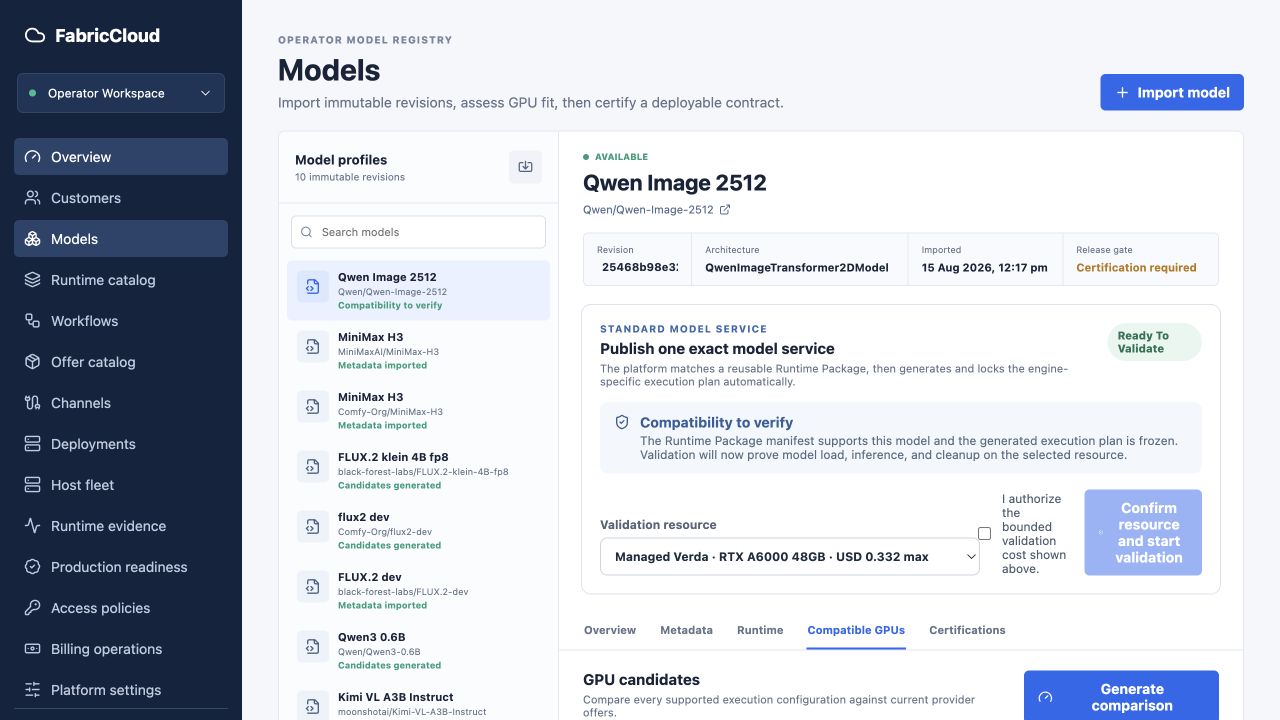
5.5 Run real certification
Real certification incurs Provider cost and may start a GPU. Run it only after explicit business authorization:
- Select the exact Candidate, Provider region, market type, and image.
- Confirm the displayed cost and budget limit.
- Acknowledge the paid-run authorization.
- Start certification.
- Observe model loading, gateway health, and a real request result.
- Wait for permanent deletion of compute and ephemeral disks.
- Accept
Certifiedonly when terminal cleanup evidence is complete.
Do not certify automatically because inventory exists. Do not automatically switch to a second paid GPU after failure. Static configuration is not runtime success evidence.
5.6 Publish an Offer
Publication requires all of the following:
- immutable model revision and Runtime Release;
- fixed Execution Variant;
- Candidate bound to a Provider SKU, region, and image;
- successful model load, gateway health, and real request;
- verified absence of certification compute and ephemeral disks;
- reviewed price, margin, data boundary, and lifecycle policy;
- required license or publication acknowledgement.
Only then does the Offer appear in the Customer Service catalog. Spot and On-Demand are separate commercial contracts, not an unannounced switch on an existing Endpoint.
5.7 Monitor Customers and Deployments
Use Customers and Deployments to review:
- organization state, balance, current spend, and active Endpoints;
- API key counts and recent activity;
- agreement between Endpoint and underlying Deployment state;
- Provider operation, resource identity, and cleanup evidence;
- degraded service, low balance, cleanup risk, and incidents;
- whether Customer Hold or Frozen state blocks new paid creation.
The platform-level Emergency stop pauses new Provider-create and certification work while allowing cleanup to continue. Record the reason and confirm that the risk is resolved before resuming paid creation.
5.8 Host Fleet and capacity pools
Host Fleet supports:
- Managed Provider pool: FabricCloud creates and deletes resources through a Provider adapter;
- Registered Host pool: an existing Agent/Host is connected without calling a Provider create or delete API;
- optional Customer-owned capacity, visible only for explicitly enabled organizations and features.
Host origin and ownership are audit metadata. ResourcePool execution mode controls lifecycle behavior. Never infer resource ownership from a display name or description prefix.
5.9 Runtime Evidence and Production Readiness
Runtime evidence records Provider placement, Runtime, Gateway, and request
evidence separately. A Provider instance being running does not prove that a
model service is usable.
Production readiness presents automated failure matrices, concurrency, cost control, incident response, and real-Provider cleanup gates. The automated simulator does not start paid Provider capacity. A real Provider run requires a separate budget, cleanup reserve, and confirmation phrase.
5.10 Billing operations
For bank transfers and other manual top-ups, select Confirm settled only after funds have settled. Confirmation adds credit to the corresponding organization's AUD wallet. Card information is not handled on this page; Stripe hosts card-payment collection.
5.11 Provider cleanup safety boundary
Credential visibility does not establish FabricCloud ownership. Cleanup must match durable Provider identity, the exact dstack project/run, a positive GPU count, and the attached OS-volume relationship.
For Verda in particular:
- the FabricCloud control-plane CPU host is not a cleanup target;
- GPUs owned by FabricScope or another project/subproject do not belong to FabricCloud;
- missing ownership evidence must fail closed and enter Operator review;
- a broad name-prefix scan must never replace exact identity matching.
Nebius likewise uses an independent project, credentials, instance identity, and disk identity. At the end of any certification or Customer run, verify in both FabricCloud and the Provider that compute and ephemeral disks are absent.
6. Troubleshooting
Offer shows Temporarily unavailable or No fresh capacity
FabricCloud does not have sufficiently fresh inventory evidence. The Customer cannot force deployment. The Operator can run a read-only Provider connection test and inventory refresh. If capacity remains unavailable, wait for recovery or publish a separately certified Offer.
Endpoint remains in Provisioning
Review Latest activity on the Endpoint. The Operator should then inspect the Deployment, Runtime Worker, dstack, and Provider boundaries separately. A fresh Portal page does not prove that backend components are current.
Endpoint is Degraded
Do not continue treating it as Ready. Record the latest event and time, then contact the Operator. The Operator should separately inspect Provider, Runtime, Gateway, and Control Plane state and prioritize safe recovery or cleanup.
Resume remains unavailable after Suspend
The old compute resource or ephemeral disk has not yet been confirmed absent. FabricCloud fails closed until cleanup evidence is complete, preventing two runtimes for one Endpoint or hidden ongoing charges.
API returns 401 or 403
Confirm that the application uses an API key rather than a browser Cookie. Check whether the key was revoked, its budget is exhausted, the model identifier matches the Endpoint, and the organization is entitled to use the service.
Why did the price change?
Every new Deploy, Resume, or Restart checks current capacity and pricing. The accepted hourly rate remains fixed for that runtime cycle. It does not automatically carry over after the cycle ends.
Contacting support
Provide the following information. Do not provide passwords, API keys, Provider credentials, prompts, or response content:
- organization name;
- Endpoint ID and name;
- displayed state;
- latest event and timestamp;
- request ID or Studio run ID;
- browser screenshot and reproduction steps.
7. Go-live checklists
Customer
- Account and organization are correct; member roles are appropriate.
- Model, region, data boundary, capacity type, and price are confirmed.
- Endpoint is
Readyand Studio validation succeeded. - API key is stored in a Secret Manager, not source code or chat.
- The application uses the exact model identifier shown on the Endpoint.
- Monthly budget, balance, and notifications are configured.
- Suspend, Resume, Restart, and Delete effects are understood.
Operator
- Provider credentials and resource identity are independent; connection tests pass.
- Offer is bound to an immutable model, Runtime Release, and Execution Variant.
- Candidate static compatibility, live availability, and cost guardrail have evidence.
- Real certification has explicit authorization and a budget limit.
- Model load, Gateway, request, and terminal cleanup evidence are complete.
- Customer price, margin, data boundary, and market type are correct.
- Published Offer is visible to Customers; an unpublished Draft is not purchasable.
- Incident, cleanup, and paid-creation stop conditions are explicit.
8. Current product boundaries
The following are not current Customer self-service commitments:
- raw GPU, VM, SSH, or Provider Console access;
- Customer modification of dstack, runtime images, or Provider credentials;
- automatic hardware or Provider fallback without exact certification;
- treating stale, unknown, or missing capacity evidence as available;
- treating Provider instance creation as Endpoint readiness;
- starting real GPU certification without explicit approval;
- sharing API keys, Endpoints, billing, or runtime data across organizations.
The platform can add Providers, runtimes, and service types while preserving the stable Customer-facing Endpoint contract. Adding a Provider must not force a Customer integration change or merge Verda and Nebius credentials, inventory, resource identity, or cleanup evidence.
9. Screenshot note
Screenshots in this manual come from the public product or real E2E/browser regression evidence. They explain control placement and state semantics. Offer names, customer names, prices, regions, timestamps, and availability may vary by environment and time. For decisions involving cost, data boundary, or availability, always use the current page and final confirmation dialog.